Oven Fan Not Working? Ventilation & Cooling Fan Repair Guide Toronto
Oven fans are critical for proper heat circulation, cooling, and ventilation. When fans fail, become noisy, or stop working, it affects cooking performance and can lead to overheating. Here's your complete guide to diagnosing and fixing oven fan problems.
Quick Answer: Oven fan noisy, not running, or overheating? Learn to diagnose convection and cooling fan issues. Expert oven fan repair in Toronto from JK Appliances.
Types of Oven Fans
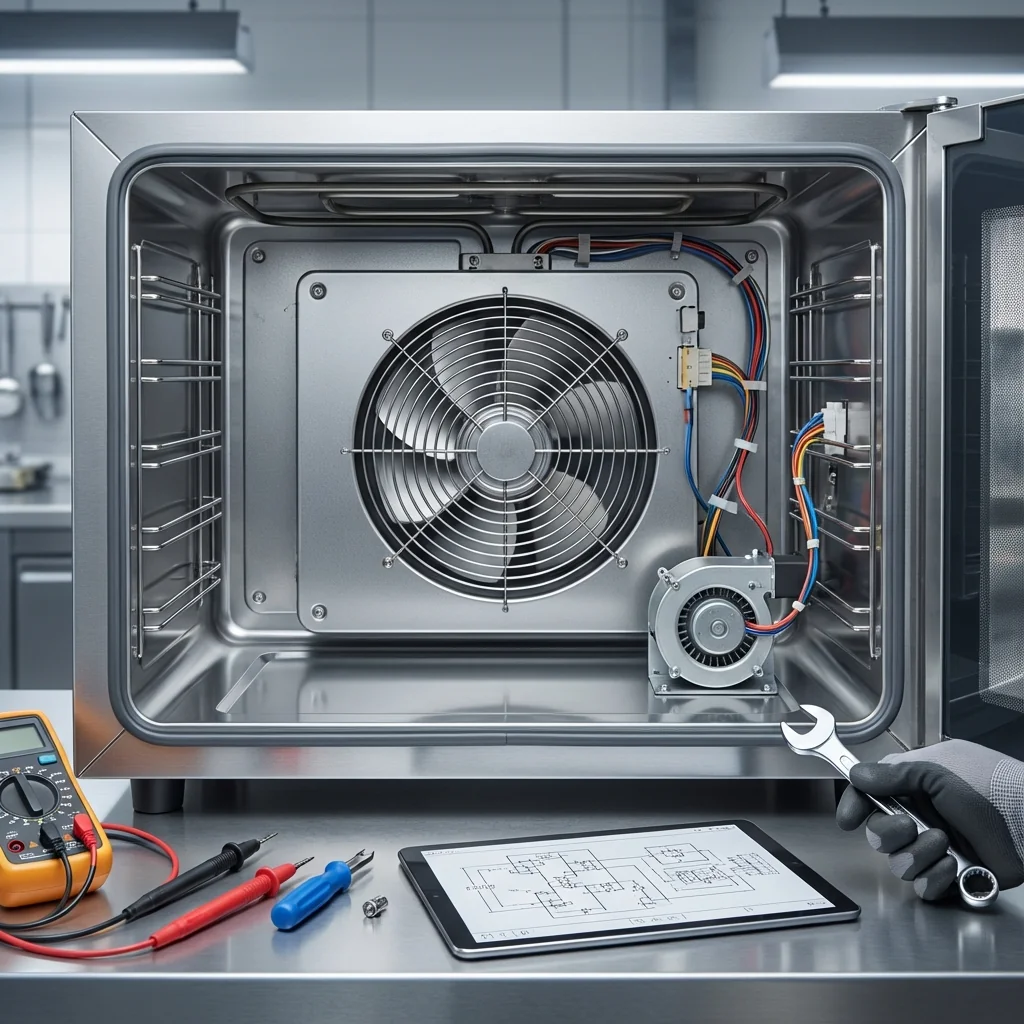
CONVECTION FAN
Purpose: Circulates hot air for even cooking Location: Usually rear of oven cavity Function: Improves heat distribution, reduces cooking time Common in: Convection and combination ovens
COOLING FAN
Purpose: Cools oven components and exterior Location: Behind or above oven cavity Function: Prevents overheating, protects electronics Operation: Runs during and after cooking cycles
EXHAUST FAN
Purpose: Removes moisture and cooking vapors Location: Top or rear of oven Function: Prevents condensation, removes odors Integration: Often combined with range hood
Common Fan Problems
FAN NOT RUNNING
Symptoms: No air circulation, silent operation, overheating Causes: Motor failure, electrical issues, control board problems Impact: Poor cooking results, potential component damage
NOISY FAN OPERATION
Symptoms: Grinding, squealing, rattling, or clicking sounds Causes: Worn bearings, loose components, debris, motor wear Progression: Usually gets worse over time
INTERMITTENT FAN OPERATION
Symptoms: Fan starts and stops randomly, inconsistent operation Causes: Loose connections, failing motor, control issues Result: Unpredictable cooking performance
FAN RUNS CONTINUOUSLY
Symptoms: Fan doesn't stop after cooking, runs when oven off Causes: Faulty temperature sensor, control board issues, stuck relay Concern: Unnecessary wear, energy waste
WEAK AIRFLOW
Symptoms: Reduced air circulation, longer cooking times Causes: Clogged vents, worn motor, damaged fan blades Effect: Uneven cooking, reduced efficiency
Diagnosing Fan Problems
INITIAL ASSESSMENT
Visual Inspection
- Look for obvious damage to fan blades or housing
- Check for debris blocking fan or vents
- Inspect electrical connections if accessible
- Note any physical damage to motor or mounting
Sound Diagnosis
- Listen during startup - should be smooth and quiet
- Note any unusual noises - grinding, squealing, clicking
- Check for vibration that might indicate imbalance
- Compare to normal operation if you remember it
Airflow Testing
- Feel for air movement during convection mode
- Check vent outlets for proper airflow
- Use tissue paper to visualize air currents
- Compare to manufacturer specifications
DETAILED TESTING
Electrical Testing
- Turn off power at breaker
- Access fan motor (may require panel removal)
- Test motor windings with multimeter
- Check for proper voltage at motor connections
- Verify control signals from main board
Motor Function Test
- Remove fan blade if possible
- Try to turn motor shaft by hand
- Should turn freely without binding
- Check for excessive play in bearings
- Look for signs of overheating
Control System Check
- Test temperature sensors that control fan operation
- Check control board outputs to fan motor
- Verify proper timing of fan operation
- Test manual fan controls if equipped
DIY Repair Solutions
CLEANING AND MAINTENANCE
Fan Blade Cleaning
- Turn off power and let oven cool
- Remove fan blade (usually clips or screws)
- Clean with warm soapy water
- Remove grease and debris thoroughly
- Dry completely before reinstalling
- Check blade balance - should be even
Vent Cleaning
- Locate all vent openings
- Use vacuum to remove loose debris
- Clean with appropriate brush or compressed air
- Check for blockages in vent passages
- Ensure clear airflow paths
Motor Housing Cleaning
- Access motor area (power off)
- Remove dust and debris with vacuum
- Clean air intake areas
- Check for grease buildup around motor
- Ensure proper ventilation around motor
MINOR REPAIRS
Tightening Loose Components
- Check fan blade mounting - tighten if loose
- Inspect motor mounting bolts
- Secure any loose panels or covers
- Check electrical connections for tightness
- Verify proper grounding
Lubricating Bearings
- Identify lubrication points (if any)
- Use appropriate lubricant (high-temperature rated)
- Apply sparingly - excess attracts dirt
- Work motor through full range of motion
- Clean excess lubricant
Note: Many modern motors are sealed and don't require lubrication.
Replacing Fan Blades
- Order correct replacement using model number
- Remove old blade carefully
- Install new blade in same orientation
- Ensure proper balance and clearance
- Test operation before closing up
Professional Repair Situations
MOTOR REPLACEMENT
Professional needed for:
- Complete motor failure
- Electrical connection complexity
- Warranty considerations
- Safety system integration
Process involves:
- Proper diagnosis of motor failure
- Ordering correct replacement motor
- Safe electrical disconnection
- Mechanical removal and installation
- Testing and calibration
CONTROL BOARD ISSUES
When fan control fails:
- Multiple fan problems simultaneously
- Erratic operation patterns
- No response to temperature changes
- Integration with other oven functions
WIRING PROBLEMS
Professional service for:
- Burnt or damaged wires
- Complex wiring harnesses
- Safety circuit involvement
- Code compliance requirements
Safety Considerations
ELECTRICAL SAFETY
- Always turn off power before working on fans
- Use proper tools rated for electrical work
- Don't bypass safety circuits
- Check for proper grounding
MECHANICAL SAFETY
- Ensure fans are stopped before inspection
- Watch for sharp edges on fan blades
- Support heavy components during removal
- Use proper lifting techniques
VENTILATION SAFETY
- Don't block ventilation openings
- Ensure proper clearances around oven
- Check for carbon monoxide in gas ovens
- Maintain adequate room ventilation
Maintenance Schedule
MONTHLY CHECKS
- Listen for unusual noises during operation
- Check for proper airflow from vents
- Clean visible debris from vent openings
- Monitor cooking performance for changes
QUARTERLY MAINTENANCE
- Deep clean fan blades and housing
- Check electrical connections for tightness
- Inspect for wear signs on moving parts
- Test all fan functions systematically
ANNUAL SERVICE
- Professional inspection of motor and controls
- Lubrication if required by manufacturer
- Electrical testing of all circuits
- Calibration check of temperature controls
Toronto-Specific Considerations
CLIMATE EFFECTS
Winter heating: Can cause condensation in fan motors Summer humidity: May affect electrical connections Temperature swings: Can cause expansion/contraction issues
POWER QUALITY
Hydro One fluctuations: Can damage fan motors Older home wiring: May not provide stable power Voltage variations: Can affect motor performance
HOUSING CONSIDERATIONS
Condos: Limited ventilation may stress cooling fans Older homes: May have inadequate electrical capacity Tight construction: May require enhanced ventilation
Cost Analysis
DIY MAINTENANCE
- Cleaning supplies: $10-20
- Basic tools: $30-50
- Replacement fan blade: $25-75
- Lubricants: $15-25
PROFESSIONAL REPAIRS
- Fan motor replacement: $200-400
- Control board repair: $300-600
- Wiring repair: $150-300
- Complete fan assembly: $300-500
PREVENTION SAVINGS
- Regular cleaning: Extends motor life significantly
- Proper maintenance: Prevents major failures
- Early detection: Reduces repair costs
- Energy efficiency: Proper fan operation saves energy
Troubleshooting by Symptom
NO FAN OPERATION
Check in order:
- Power supply - breaker, connections
- Control settings - convection mode selected
- Temperature sensor - may prevent fan operation
- Motor condition - electrical and mechanical
- Control board - may not be sending signals
NOISY FAN
Diagnose by sound:
- Grinding: Usually worn bearings
- Squealing: Belt or bearing issues
- Rattling: Loose components or debris
- Clicking: Damaged fan blade or obstruction
WEAK AIRFLOW
Common causes:
- Clogged vents - clean thoroughly
- Dirty fan blades - reduce efficiency
- Worn motor - reduced power output
- Damaged blades - poor air movement
INTERMITTENT OPERATION
Typical issues:
- Loose connections - check all electrical
- Overheating motor - may shut down thermally
- Control board - erratic signal output
- Temperature sensor - inconsistent readings
When to Repair vs. Replace
REPAIR IF:
- Single component failure (motor, blade, etc.)
- Oven less than 10 years old
- Repair cost under $300
- Other oven functions work well
REPLACE OVEN IF:
- Multiple fan and other problems
- Oven over 15 years old
- Repair costs exceed 50% of replacement
- Energy efficiency concerns
Emergency Procedures
OVERHEATING OVEN
- Turn off oven immediately
- Check cooling fan operation
- Ensure proper ventilation around oven
- Don't use until repaired
- Call professional if overheating persists
SPARKING FAN MOTOR
- Turn off power at breaker immediately
- Don't touch any electrical components
- Ventilate area if any smoke
- Call professional immediately
- Don't attempt to use oven
FAQ
Q: Should my convection fan run all the time during cooking? A: Only when convection mode is selected. In regular bake mode, it typically doesn't run.
Q: Why does my cooling fan keep running after I turn off the oven? A: This is normal - cooling fans often run until internal temperature drops to safe levels.
Q: Can I replace just the fan blade if it's damaged? A: Usually yes, if the motor is still good. Make sure to get the exact replacement part.
Q: How do I know if my fan motor is failing? A: Common signs include unusual noises, reduced airflow, intermittent operation, or complete failure to start.
Q: Is it safe to use my oven if the cooling fan isn't working? A: Not recommended - cooling fans prevent overheating and component damage. Have it repaired promptly.
Keep your oven running cool and efficient! JK Appliances specializes in oven fan diagnosis and repair throughout Toronto. From noisy convection fans to failed cooling systems, our technicians can restore proper operation. Call (647) 560-8966 or book online for expert fan repair service.